
Controlling a Nelko P21 from Linux
2026-07-19 Tags: labels automation
I like labeling things around the house and for years I have been using A4 sheets of labels (like these ones and others I bought in person) that I could just print from my printer. They work great, but have 2 major downsides:
- You need to print many at once, my current sheets hold 24 labels each.
- They are not waterproof, making kitchen use almost impossible.
As an alternative to the paper labels, I also own a Dymo 160 (just realized I bought it 8 years ago already). It prints very reliable labels, but needs to be used with its own keyboard and can only print text. The label reloads are also quite expensive and wasteful since they need a full cartridge that gets thrown away.
After many years of looking for a label printer, I stumbled on the Nelko P21. It's cheap, small and most importantly: can be controlled over bluetooth. The labels are pre-cut, waterproof, the resolution seems acceptable and there's no ink to dry out from sporadic usage. What sold me on this printer was the Fyne-P21-Print project, which allows you to control the printer from the desktop.
Unfortunately, Fyne-P21-Print only has a GUI to print labels (which the Nelko Android app already offers). So I started working on a CLI tool that just prints labels: p21-print. With the help of Claude it only took 2 days to set it up based on existing implementations and investigations performed by others. Thank you TylerCode for Fyne-P21-Print and merlinschumacher for nelko-p21-print.
With the CLI, you can print images and control the printer. Nothing more, nothing less. Everything is tested on my actual printer and I have used it to automatically print archival labels for a bunch of items. Look at the README for details on how to use it.
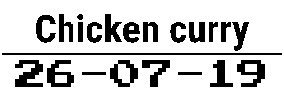
It's enough to automate label printing in my setup. I built another (private) tool that uses SVG templates to print my labels and I just provide the data. For example, I have my cool new template for freezer food:
What's next:
- Fixing printing many labels (I need more labels to test this)